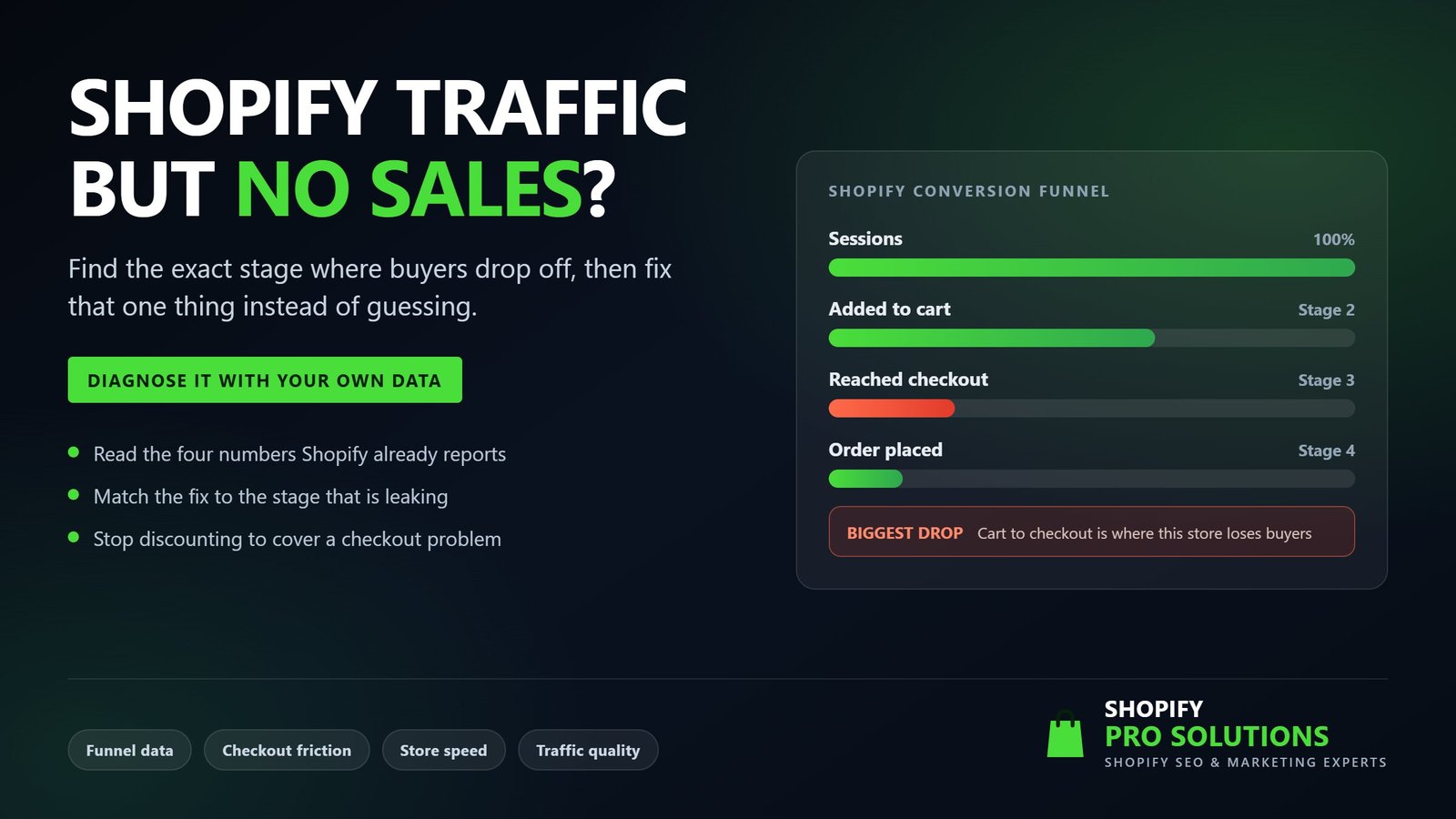
Shopify traffic but no sales is one of the most common problems store owners bring to us. It is rarely caused by the whole store being broken. Almost always, one specific stage of the buying journey leaks visitors while the rest works fine. The useful part is that Shopify already records where that leak sits, so you do not have to guess.
This guide shows you how to read your own conversion funnel, work out which stage is failing, and then apply the fix that matches the problem. Work through it in order and you should have a clear diagnosis within an hour, using data you already own.
Why Shopify traffic but no sales is a funnel problem, not a store problem
Every visitor who does not buy stops at one of three points. They leave before adding anything to the cart, they add to the cart and never start checkout, or they start checkout and abandon it. Each point has different causes and completely different fixes.
So the statement that a store is not converting describes a symptom, not a diagnosis. Naming the stage turns a vague and expensive problem into a short checklist. It also prevents the most costly mistake in ecommerce, which is spending a month fixing something that was never broken. If you lose people inside checkout and you respond by rewriting product descriptions, nothing changes.
Start with the conversion funnel Shopify already gives you
Almost every case of Shopify traffic but no sales can be narrowed down in about ten minutes with a single report, and you already have it.
Where to find your funnel data
In your Shopify admin, open Analytics, then Reports, then look under the behaviour reports for Conversion rate breakdown and Conversion rate over time. The Analytics overview page shows the same funnel inside the Online store conversion rate card. Shopify explains what each stage counts in its official behaviour reports documentation.
What the four numbers actually mean
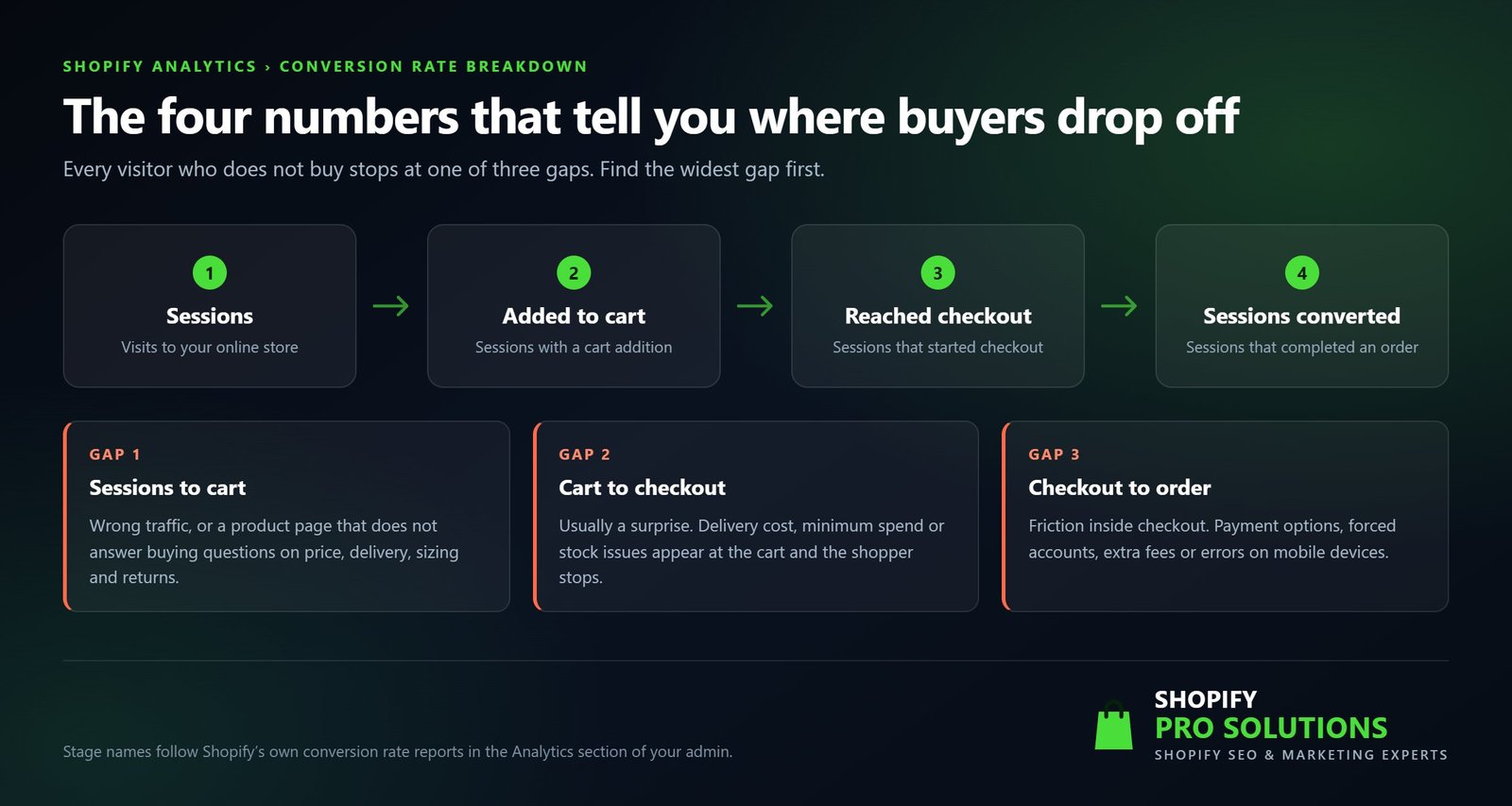
- Sessions. Visits to your online store during the period you select.
- Sessions with cart additions. Visits where a shopper added at least one product to the cart.
- Sessions that reached checkout. Visits where the shopper started the checkout.
- Sessions converted. Visits that ended in a completed order.
Compare the gaps, not the totals
Write those four numbers down for the last 90 days. Then look at the percentage drop between each consecutive stage. The widest drop is where your work starts, and everything else can wait.
Resist the urge to compare your store against a published industry average. Conversion rates vary enormously by category, price point, delivery model and traffic source. A blended average across all Shopify stores therefore tells you very little about yours. Your own store over the previous 90 days is a far better benchmark, and comparing your own traffic sources against each other is better still.
| Where the biggest drop sits | What it usually means | Where to look first |
|---|---|---|
| Sessions to cart additions | The wrong visitors, or a product page that does not answer buying questions | Sessions by landing page, sessions by traffic source, product page content |
| Cart additions to checkout | A surprise at the cart, usually delivery cost or a minimum spend | Your cart page and cart drawer on mobile, delivery rates by zone |
| Checkout to completed order | Friction inside the checkout itself | Abandoned checkouts, payment methods, delivery options |
| Fairly even drops on very low volume | Not enough qualified demand reaching the store | Traffic strategy rather than the store |
Pattern one: visitors arrive but almost nobody adds to cart
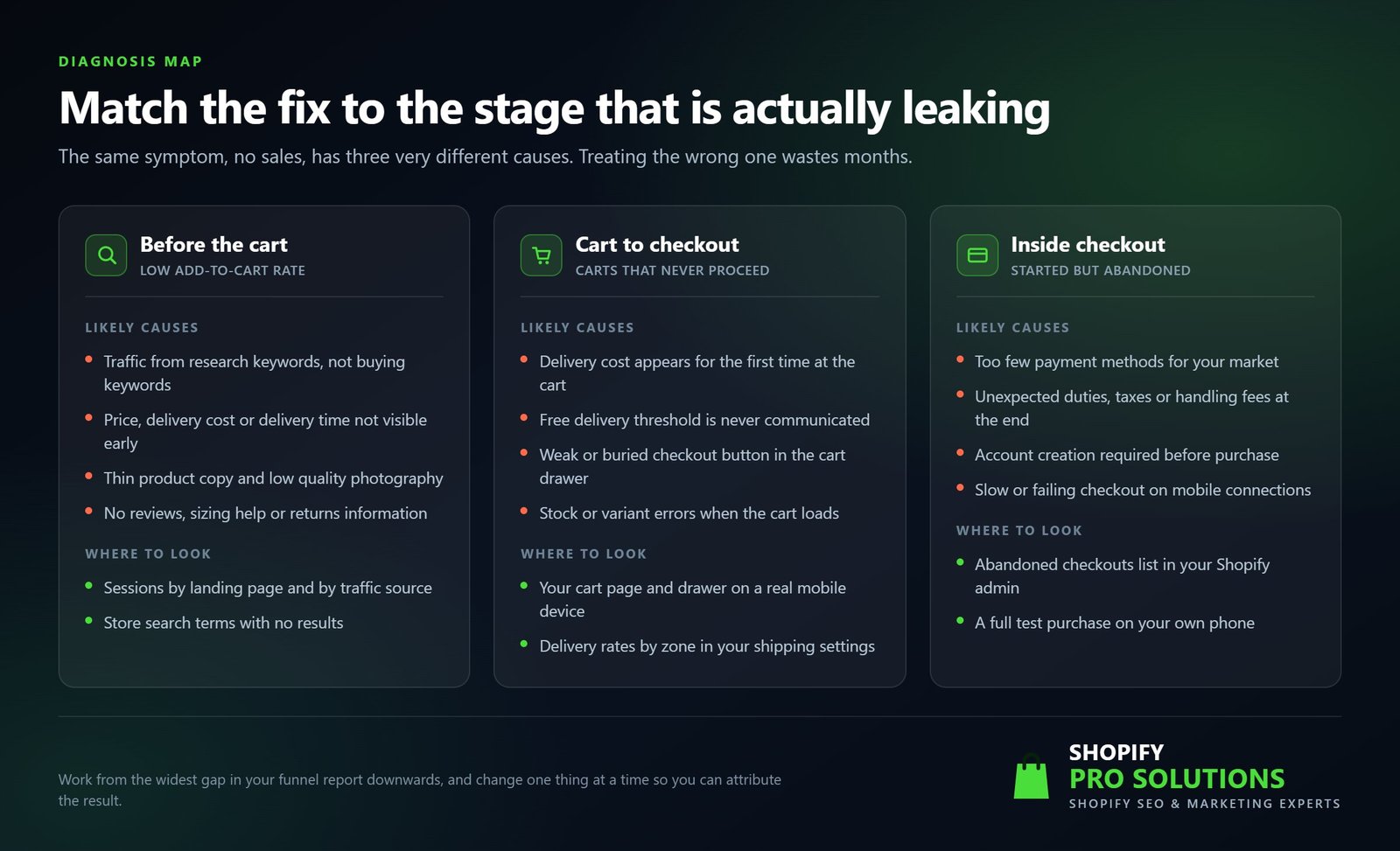
If the drop between sessions and cart additions is the widest, your problem sits before the cart. There are two broad explanations. Rule out the first before you spend money on the second.
Rule out a traffic quality problem first
Open Sessions by traffic source and Sessions by landing page, then compare each source separately. Two patterns come up again and again.
- Organic visitors landing on blog posts and guides. These people are researching rather than buying, so a low add to cart rate is normal here and not a fault.
- Broad paid or social audiences. Cheap clicks from a wide audience fill your sessions report without ever producing an order.
If one source converts and another does not, you have a traffic problem rather than a store problem. That single distinction saves months. Where the real issue is that you rank for research terms instead of buying terms, our guide on why a Shopify store is not ranking on Google covers the technical side, and our Shopify SEO specialists focus on commercial keywords rather than volume for its own sake.
Answer the questions that stop people adding to cart
Once you trust the traffic, read the product page as a sceptical first time buyer would. In our experience these are the points that decide it.
- Price, delivery cost and delivery timing visible without scrolling. Unclear delivery cost is the most common reason a shopper leaves a product page.
- Photography that shows scale, materials and the product in use, not only a cutout on white.
- Sizing, fit or specification detail in a form that removes doubt instead of adding it.
- A returns policy stated in plain language near the buy button.
- Reviews or other evidence that real people have already bought this.
- One clear primary action. If Add to cart competes with a popup, a chat bubble and three upsell widgets, it loses.
- Variant selection that makes availability obvious rather than failing silently when a size runs out.
Let your internal search tell you what is missing
The Searches with no results and Searches with no clicks reports are the most under used data in the Shopify admin. They show you, in your customers own words, what they expected to find and did not. Repeated searches with no results usually point to a missing product, a naming mismatch or a collection you have not built yet.
Pattern two: people add to cart but never start checkout
A wide gap between cart additions and reached checkout almost always means the shopper met a surprise. Something unexpected appeared once the cart loaded, and either the price or the effort changed.
These are the usual culprits.
- Delivery cost appearing for the first time at the cart. If it was not on the product page, the cart becomes bad news.
- A free delivery threshold that exists but is never communicated, so nobody realises they are close to it.
- Taxes, duties or handling fees added at the cart for international shoppers.
- A cart drawer where the checkout button sits below the fold on a phone.
- Upsell or bundle apps that insert a step between the cart and the checkout.
- Stock or variant errors that surface when the cart loads, which destroy confidence instantly.
The fastest way to find your own version of this is to buy from yourself. Add a product to the cart on your own phone, using mobile data rather than office wifi, then count the taps between the product page and the payment screen. Anything that makes you hesitate will stop a stranger completely.
Pattern three: checkout starts and then gets abandoned
When people reach checkout and do not finish, the causes are narrower, because Shopify controls most of that experience. That is helpful, since it leaves a short list to check.
- Payment methods. UK shoppers increasingly expect Shop Pay, Apple Pay or Google Pay, PayPal and a buy now pay later option such as Klarna or Clearpay. Missing the one your audience prefers costs orders quietly.
- Forced account creation. Requiring an account before purchase removes a share of first time buyers.
- Delivery choice. A single slow option, or a cost that only becomes clear at the final step, causes late abandonment.
- International duties and taxes presented as a shock at the end rather than earlier.
- Errors on mobile connections, particularly where third party scripts load into the checkout.
- Missing reassurance. Contact details, a returns statement and clear delivery timing matter more at this stage than anywhere else.
Shopify can also send abandoned checkout recovery emails automatically, and they are worth switching on. Treat them as recovery rather than a cure, though. If half your checkouts are abandoned, an email brings a few people back while the underlying cause keeps costing you the rest.
Shopify traffic but no sales when the funnel already looks fine
Sometimes every stage looks reasonable and the store still does not behave like a business. When that happens, Shopify traffic but no sales is a demand problem rather than a conversion problem. Usually one of the following is true.
- The traffic volume is simply too small. A few hundred sessions a month produces a handful of orders even at a healthy conversion rate, and no amount of optimisation fixes that.
- The traffic is concentrated on informational content with no route to a product. Blog posts that never link to a relevant collection collect readers, not customers.
- The average order value is too low to cover what you pay to acquire a customer, so the store looks busy and still loses money.
- Everything depends on discounts. Sales appear during promotions and stop between them, which is a positioning problem rather than a conversion problem.
Those situations need channel strategy rather than button colours. That is the work our Shopify marketing support covers, and it normally starts by deciding which channel can realistically produce qualified demand at your price point. You can see the kinds of stores we have worked on in our portfolio of Shopify projects.
Technical problems that quietly suppress every stage
Some issues never show up as one obvious gap. Instead they take a slice out of every stage, which makes them easy to miss.
- Speed. Shopify includes a web performance report built on Core Web Vitals. Google treats a page as good when Largest Contentful Paint is within 2.5 seconds, Interaction to Next Paint is 200 milliseconds or less and Cumulative Layout Shift is 0.1 or less, measured across real visits.
- App accumulation. Every app that injects a script costs load time. Stores running for a few years often carry apps nobody uses any more.
- Mobile layout faults. A sticky bar covering the buy button, or a popup that cannot be closed with a thumb, will never appear in a report.
- Consent banners and third party scripts that block interaction or break tracking.
- Measurement itself. Duplicate analytics tags, bot traffic and misconfigured pixels inflate sessions and make your conversion rate look worse than it is. Before you optimise against a number, confirm the number is real.
If the constraint turns out to be the theme rather than the content inside it, that becomes a Shopify store design and build question rather than a marketing one.
A diagnosis you can run this week
Work through this sequence the next time you see Shopify traffic but no sales, and write down what you find at each step.
- Pull the last 90 days of your conversion funnel and write down all four numbers.
- Identify the widest gap between two consecutive stages.
- Segment that funnel by traffic source, so you know whether one channel is dragging the average down.
- Complete a full purchase on your own phone, on mobile data, and note every point of hesitation.
- Check Searches with no results for demand you are not currently meeting.
- Review your delivery costs, thresholds and options exactly as a customer sees them.
- Open your web performance report, then remove any apps you no longer use.
- Change one thing, then wait for a fair sample before you judge it.
Common mistakes when sales dry up
- Discounting first. A discount hides a checkout problem for a fortnight and teaches customers to wait for the next sale.
- Redesigning the whole theme. A full redesign replaces a known funnel with an unknown one and destroys your ability to compare.
- Installing several apps at once. When three things change together, the result teaches you nothing.
- Judging a change on a few days of data. Low traffic stores need patience, otherwise you are reading noise.
- Copying a much larger brand. Their audience already trusts them, so their checkout can carry friction that yours cannot.
When it makes sense to bring in help
Plenty of this is work a capable store owner can do alone, and many cases of Shopify traffic but no sales get solved without anyone external. We would rather you fixed an obvious delivery problem yourself than paid anyone to point at it. Outside help earns its place in three situations. First, when the funnel data disagrees with what you believe about your customers, and someone needs to test rather than argue. Second, when the constraint is demand rather than conversion, because that needs channel strategy and time. Third, when the fixes are technical and touching the theme risks breaking something that currently works.
If you would like a second opinion, we can review your funnel, your product pages, your checkout and your traffic mix, then tell you which single stage costs you the most. You can also work through our Shopify store audit checklist yourself first, or look at the services we offer if you would rather hand the whole thing over.
Frequently asked questions
How much traffic do I need before my conversion rate means anything?
Enough for the numbers to stop swinging. With a few hundred sessions a month, a single order moves your conversion rate noticeably, so judge trends across 90 days rather than weeks. Below that volume, the honest answer is that you have a traffic problem to solve first.
Is Shopify traffic but no sales always a website problem?
No. It is just as often a traffic problem. If your visitors arrived from research keywords, broad interest targeting or a giveaway, they were never going to buy today, and no change to the store will persuade them.
Why do I get sales from one channel and nothing from another?
Because intent differs by channel. Someone searching for a specific product sits much closer to buying than someone who paused on a video. Always compare conversion rates by source before you conclude that the store is at fault.
How long should I leave a change before deciding it worked?
Long enough to collect a comparable sample, which for most small stores means a few weeks rather than a few days. Compare like for like periods too, since weekends, paydays and promotions all distort short windows.
Do abandoned checkout emails fix a bad checkout?
No. They recover a portion of orders you would otherwise lose, which is worth having. However, they do not remove the friction that caused the abandonment, so treat them as a safety net rather than a solution.
Can slow loading really stop sales on Shopify?
Yes, and it usually appears as a smaller drop at every stage rather than one dramatic gap. Check the web performance report in your admin, then look at what your theme and your apps load before you blame the platform.
Should I fix SEO or conversion first?
Fix whichever is the binding constraint. If you already have traffic and it does not convert, start with conversion, because more of the same traffic will not help. If your funnel is healthy but volume is tiny, invest in improving your Shopify store organic visibility instead.
Does my theme affect conversion rate?
It can, although less than most people assume. Theme choice matters mainly through speed, mobile layout and how clearly it presents price, delivery and the buy button. A well configured free theme usually beats a heavily customised premium one that loads slowly.
Shopify traffic but no sales: the short version
Shopify traffic but no sales is a measurable problem rather than a mysterious one. Find the widest gap in your funnel, work out whether it sits before the cart, between the cart and checkout, or inside checkout, then fix that one stage properly before touching anything else. Guessing is what makes this expensive.
If you would like us to run that diagnosis with you, get in touch for a free Shopify store audit and we will tell you where your store is losing buyers.